
t9999 Indonesia Home for Casino and Sportsbook
t9999 puts Lightning Roulette Room, Sriwijaya Gold Reels, Esports Valorant and Aviator Crash Game behind one clear account path, with…

Familiar payment chips for Indonesia
and Indonesia payment rails are described as service context, where local law permits.

Built for phones, clean on desktop too
Cards, tables, FAQ and policy pages stay readable on small screens so you can find information on any device.
Casino and Slots from One Home
Casino and slots appear together on our Home page, so you can move from dealer tables to reel rooms without searching through unrelated menus.






Six Games Shape the Home Lobby
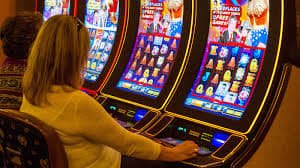
Six named rooms show what you can expect before opening an account. Lightning Roulette Room handles the live-table route, while Sriwijaya Gold Reels sits in the slot area. Aviator Crash Game and Fishing War Mobile Play offer shorter round formats, Adu Q Table adds a card-room choice, and Esports Valorant connects the Home page with competitive markets. We also place
live baccarat, Dragon Tiger and blackjack in their own table context. Football, badminton and basketball remain inside the sportsbook rather than being mixed into casino results, helping you reach the category you intended to browse.
Four Wallets and Three Sports
Phone Verification Before Home Access
A clear phone step comes before account access. Start from the account link on Home, enter the requested account details and complete the phone verification prompt before trying to reach the lobby or cashier. Once verified, the same account connects casino categories, sportsbook markets and local wallet choices, removing the need to create separate profiles. Keep the phone connected to
your account available when an access check appears. If the verification state does not update, return to the account area rather than submitting a second profile, then use the nearby help path to request an account-status check.
Live Casino Beside Mobile Slots
Deposits and Withdrawals from Home
Payment status matters as much as choosing a rail. From Home, open the cashier, select DANA, OVO, GoPay or QRIS, and check that the wallet name matches the intended route before confirming a deposit request. Bank transfer and virtual account choices show a separate path for BCA, BRI, Mandiri and BNI contexts. For withdrawals, account verification must be complete before
the request can move through status checks. Processing time can vary by rail and account state, so we show the current state in the cashier. Keep your transaction receipt available if you need us to trace a pending entry.
Four Signals You Can Verify
Useful credibility comes from details you can inspect rather than broad claims. Our Home page exposes the supported local rails, separates casino and sportsbook categories, places phone verification before account access, and…
Named payment routes
The Home cashier identifies DANA, OVO, GoPay, QRIS, virtual account and bank transfer separately, helping you choose the intended route before sending a transaction.
Verified account entry
Phone verification is placed before account access. This creates a visible checkpoint between submitting account details and entering the casino or sportsbook lobby.
Separated lobby categories
Live tables, slots, quick-round games and sports markets use distinct Home paths, reducing accidental switches between casino play and sportsbook selections.
Visible policy access
Account terms, privacy terms and regional access wording remain reachable from the Home footer, where you can check conditions before opening an account.

Mobile Home Keeps Wallet Status Close
One mobile path connects login, Home, the lobby and the cashier. Open t9999 in your phone browser, complete the account check if requested, then use the fixed navigation to move between casino categories and wallet status. QRIS is positioned as a named payment choice, so you do not need to search through a generic transfer menu. Game rows scroll across
the screen while account controls stay available through the main menu. Fishing War Mobile Play and the slot search are suited to this compact layout, while live tables can expand into a wider viewing area when your screen orientation changes.
DANA to Bank Transfer from Home
Six cashier choices cover wallets, QR payments and bank-based routes from the Home page.
Slots and Casino Stay Searchable
The final Home game row gives casino and slots another entry point after the cashier details, making it easy to resume browsing without returning to the page header.
Secure Home Access Starts with Your Phone

Phone verification is the first visible account checkpoint on Home. Complete it before using the cashier, and avoid sharing verification prompts, passwords or transaction receipts outside the account-help path. A receipt may be needed for a payment trace, but it should only relate to the transaction being checked. If your login state changes unexpectedly, leave the game room and return
through the main Home address rather than following a message link. You can then inspect account status and contact help from the menu. Policy links in the footer explain privacy, account use and access conditions in one consistent location.
Three Home Routes for Account Help
Three common problems have direct paths from Home: account access, wallet status and payment receipt checks. Start with the area connected to the issue instead of opening a fresh account or submitting the same transaction twice. The account menu handles phone-verification and login-state questions, while the cashier path keeps payment method and transaction context together. For a payment trace, provide the selected rail, current status and relevant receipt through the available help prompt. This gives us enough context to distinguish a DANA issue from an OVO, GoPay, QRIS or bank-route issue.
Account access help
Use the account-area help path when phone verification or the login state does not update. Keep the affected account details ready and avoid creating a duplicate profile.
Wallet status check
Open help beside the cashier when a DANA, OVO, GoPay or QRIS status stalls. Name the exact rail and current state so we can follow the correct payment path.
Receipt tracing
Keep the receipt linked to a pending transfer or wallet request. Submit it through the payment-help prompt with the rail and status, rather than sending another transaction.
Indonesia Access and Home Policy Links
Regional access depends on local law, and the Home footer is where we place the terms that apply to account use, privacy and site access. Read those links before opening an account, particularly if you are connecting from a different location or using a payment method tied to another region. The presence of DANA, OVO, GoPay, QRIS, virtual account or
bank transfer does not by itself establish eligibility. Our Home page shows the available path, while your account state and applicable conditions determine whether you can proceed. If the access message is unclear, use account help before entering payment details.
Seven Answers About t9999 Home
These answers cover what you can reach from the t9999 Home page before opening an account: lobby categories, phone verification, local wallets, mobile behaviour, withdrawals, help and Indonesia access. Each route starts from Home so you can check the relevant category or status without relying on an external link. Named choices include DANA, OVO, GoPay, QRIS, virtual account and bank transfer. Game areas include slots, live tables, quick-round rooms and the sportsbook. If an account or payment state stalls, use the connected help path rather than repeating the same step.